
What Is Phishing attack in Cybersecurity? 7 Real Examples
Imagine this.
You receive an email from your bank, which says, “Your account will be blocked in 24 hours. Click here to verify.” Seeing this message, you panic and don’t know what to do.
Without thinking, you click on the link and fill in all your details. But within seconds, you receive another message saying that money has been deducted from your account.
To learn how to protect your data from hackers, read this article: How to Protect Data From Hackers: 9 Proven Methods (2026)
You might think this is hacking, but it’s just a part of hacking. This is called phishing.
In this guide, I’ll explain exactly what is phishing attack in cybersecurity, how it works, and share seven examples of attacks that cause many people to lose money or important data every day.
I’ll also tell you how you can protect yourself from them. In this guide, I’ll explain everything step-by-step in simple, easy-to-implement language.
What Is Phishing Attack in Cybersecurity?
Phishing attacks are a type of cybercrime in which attackers send fake messages to deceive people into sharing sensitive information.
These messages appear genuine, but the attacker exploits this to steal data such as passwords, OTPs, credit card details, and bank details.
The attacker claims to be a trusted source and may pose as anyone, such as a bank, a company like Amazon, a government office, a friend, or a colleague.
This makes you believe they are genuine, and you share your details. The attacker’s sole objective is to obtain genuine information and steal your data or money.
Why Is It Called “Phishing”?
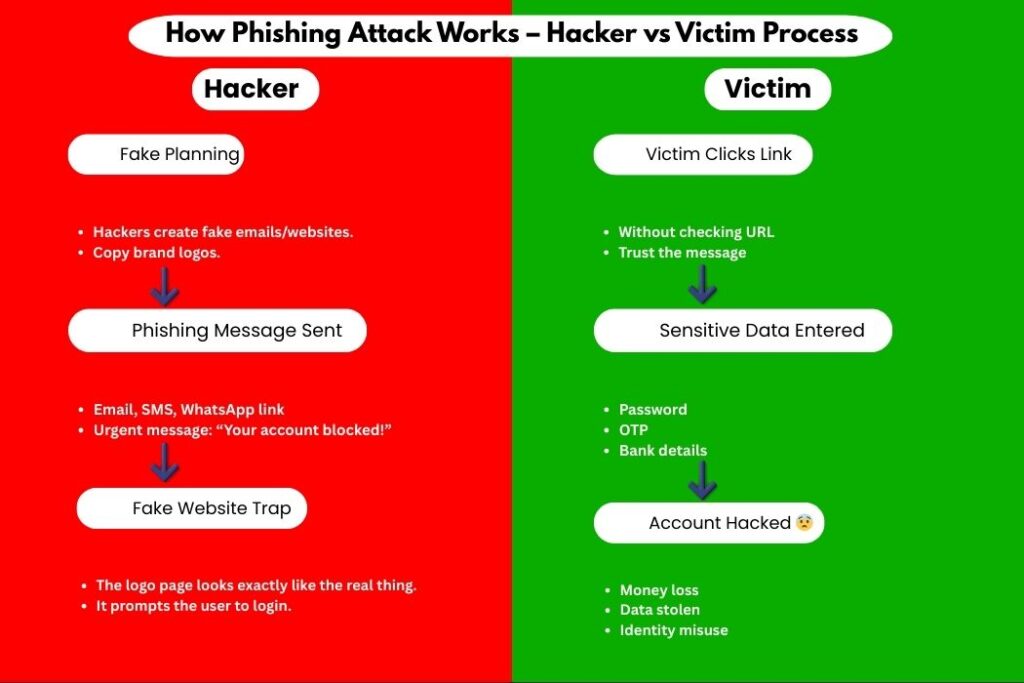
The word “phishing” comes from phishing, meaning it’s similar to what fishermen do. Hackers send fake messages (bait) to their targets and wait for them to take the bait.
As soon as their targets take the bait (click on the message), they are trapped, losing their data and money. Sadly, millions of people fall for it, and that’s because they’re unaware.
Why Phishing Attacks Are So Dangerous
As I mentioned earlier, hackers send messages that appear genuine. Phishing attackers target human emotions, targeting people who are new and unfamiliar. Phishing attacks often involve even well-educated individuals.
Click here to know more about phishing attack: What Is Phishing Attack in Cyber Security?
They don’t require any technical skills to fall for them. Hackers don’t breach any systems; they break your trust.
How a Phishing Attack Works (Simple Steps)
Here’s the usual flow:
The attacker creates a fake message
The message looks real and urgent
The victim clicks a link or downloads a file
Victim enters personal information
Attacker steals data or money
That’s it.
Common Types of Phishing Attacks
Before I share a real-life example, it’s important to understand the different types. Hackers can target you in many ways.
1. Email Phishing
In email phishing, hackers send you emails related to a company, bank, or job, which you believe to be important and prompt you to act quickly.
2. SMS Phishing (Smishing)
In SMS phishing, hackers send fake messages via SMS or WhatsApp that appear genuine.
3. Voice Phishing (Vishing)
Sometimes, a hacker may call you, claiming to be from a bank or that you’ve won a lottery, in an attempt to trick you.
4. Social Media Phishing
Many scams are happening on social media these days. It’s hard to believe everything that’s shown online. This makes it easy for hackers to rob people.
5. Website Phishing
You may have noticed that sometimes you receive links in messages that, when clicked on, take you to a website that appears to be real. Hackers use this as a form of website phishing.
7 Real Examples of Phishing Attacks
After you understand the different types of phishing attacks, I’ll share seven real-life examples that will help you understand how hackers attack and who they target.
Example 1: Fake Bank Email Alert
You receive an email saying:
“Your bank account is suspended due to unusual activity.”
The email:
Uses the bank logo
Has official-looking language
Contains a “Verify Now” button
The link opens a fake bank website.
Once you enter details, attackers steal them.
Example 2: Amazon Fake Order Confirmation
Message says:
“Your Amazon order of ₹24,999 has been confirmed.”
You panic because you didn’t order anything.
You click “Cancel Order”.
Fake website opens.
Do you want to make money online? Click here to learn about the best AI tools for making money online: 15 Best AI Tools to Make Money Online in 2026 (Complete Guide)
You enter your login details.
Game over.
Example 3: WhatsApp Lottery Scam
Message claims:
“Congratulations! You won ₹5 lakh from WhatsApp lottery.”
They ask for:
Name
Phone number
OTP
This is pure phishing.
Example 4: Instagram “Copyright Warning”
Creators often get messages like:
“Your Instagram account will be deleted in 24 hours.”
A fake support link is given.
Once clicked:
Login page opens
The password gets stolen
Account is hacked.
Example 5: Fake Google Security Alert
Email says:
Suspicious login detected. Secure your Google account.”
Link looks real.
The website looks identical to Google.
But it’s fake.
Example 6: Office Email Scam (CEO Fraud)
Employee receives mail from “CEO” asking:
“Send me gift card codes urgently.”
Employee trusts the sender.
Sends codes.
The company loses money.
Example 7: Job Offer Phishing
Email claims:
“You are selected. Pay ₹1,500 registration fee.”
Fake company name.
Fake HR profile.
Money gone. No job.
Table: Real Phishing Examples vs Reality
| Phishing Message | Reality |
|---|---|
| Bank alert email | Fake website |
| Prize message | No lottery |
| Job offer | Scam |
| Account warning | Data theft |
| Refund link | Malware |
How to Identify a Phishing Attack
Here are clear warning signs.
Red Flags to Watch
Urgent language
Spelling mistakes
Unknown sender
Suspicious links
Requests for OTP or passwords
If it feels rushed, stop.
How to Check a Phishing Link Safely
Before clicking any link:
Hover the mouse over the link
Check the spelling of the website name
Look for HTTPS (not enough, but helpful)
Google the message content
Never click blindly.
How to Protect Yourself from Phishing Attacks
This is where action matters.
Step 1: Use Strong Passwords
Most people use simple and consistent passwords across all their accounts, which are very easy for hackers to crack. You should always use a strong password that is at least 12 characters long. Never use your name, date of birth, or place name in your password.
Step 2: Enable Two-Factor Authentication (2FA)
Always keep two-factor authentication enabled on your device. This will ensure that even if a hacker cracks your password, they won’t be able to log in without an OTP.
Step 3: Install a Trusted Antivirus
Install a trustworthy antivirus on your device. This antivirus protects your device from phishing websites, detects fake links, and provides real-time protection.
Step 4: Keep Your Device Updated
This is where most people make a mistake; they don’t update their devices on time. But this can put you at risk because the older the device, the easier it is to hack. So, keep your device updated regularly.
Step 5: Never Share OTP or PIN
Never share your OTPs or PINs with anyone. Because when you share your OTP or PIN with anyone, you never know when they might scam you. So avoid sharing it.
What to Do If You Fall for a Phishing Attack
Don’t panic.
Do this immediately:
Change all passwords
Inform your bank
Enable 2FA
Scan the device for malware
Report phishing email
Quick action reduces damage.
Why Phishing Attacks Are Increasing
Reasons include:
More online payments
Work-from-home culture
Social media usage
Low awareness
Hackers target people, not systems.
Phishing vs Hacking (Simple Difference)
| Phishing | Hacking |
|---|---|
| Tricks users | Breaks systems |
| Uses fake messages | Uses technical skills |
| Targets emotions | Targets vulnerabilities |
Conclusion: What Is Phishing Attack in Cybersecurity?
In this guide, I’ve explained what is phishing attack in cybersecurity. By now, you should know what a phishing attack is and how it works.
I’ve also explained how to prevent it. It’s one of the most dangerous and common cyber threats because hackers use it to easily trap their targets.
Phishing attacks target human trust. In this guide, I’ve presented all the examples, and you can see how clever hackers are. You shouldn’t panic after hearing all this; instead, you need to think calmly.
If you act rashly, your work may be ruined. However, if you make informed decisions, you can overcome any challenge.
Always keep learning and use your mind, because there’s nothing that humans can’t avoid. You need the right information, not panic.
FAQs – What Is Phishing Attack in Cybersecurity?
1. What is phishing attack in cybersecurity in simple words?
It is a trick where attackers pretend to be trusted sources to steal your personal data.
2. Is phishing illegal?
Yes. Phishing is a serious cybercrime in most countries.
3. Can antivirus stop phishing attacks?
Yes. Good antivirus software blocks phishing websites and malicious links.
4. Are phishing attacks only done through emails?
No. They also happen via SMS, calls, social media, and fake websites.