
10 Hidden Canon G7X Features Every Beginner Needs to Know!
Introduction
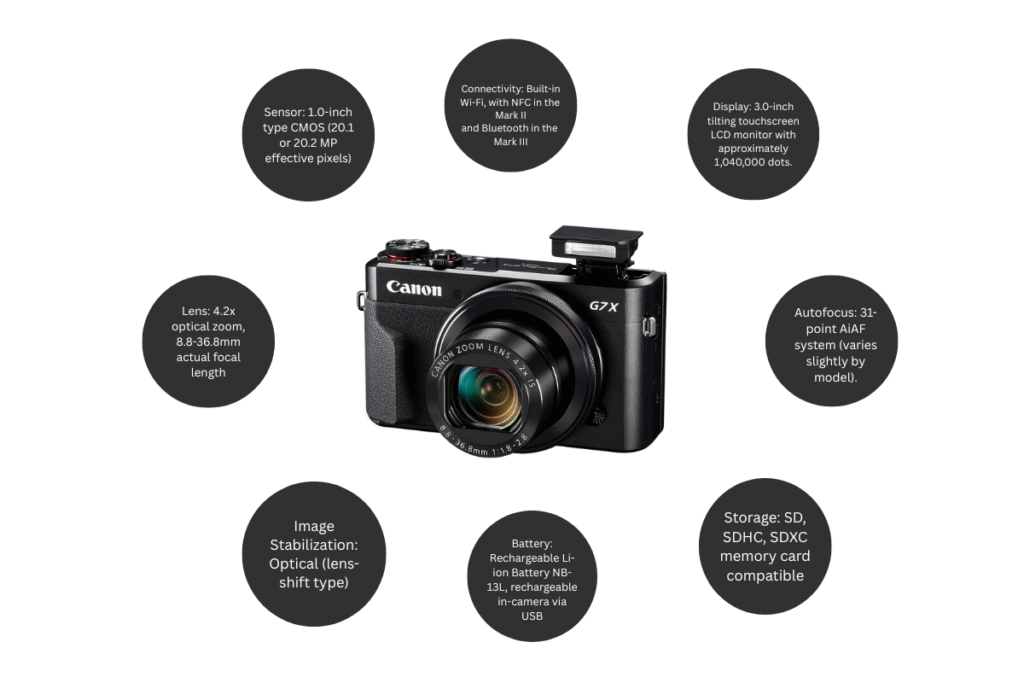
These days, everyone wants to be a vlogger and content creator. Therefore, anyone who wants to become a vlogger or content creator needs a good camera for vlogging, content creation, tech reviews, and solo travel. The Canon G7x is a great camera for all of these purposes. It’s pocket-sized, yet excellent, low-light performance, fast autofocus, and professional video quality. When you unlock the Canon G7x’s advanced internal features, it becomes even more powerful. While everyone owns a camera these days, many people aren’t aware of its hidden features, preventing them from using it effectively. Today, we’ll explain the hidden settings of the Canon G7x camera so you can use it effectively.
In today’s detailed article, we’ll reveal 10 hidden features of the Canon G7X that most people miss.
1. Customizable Function Buttons
Most users scroll through menus every time they need to adjust ISO, shutter speed, white balance, or focus modes. But the Canon G7X allows you to assign these controls to shortcut buttons.
How it works:
Go to Menu → Custom Functions
Assign the settings you use most (ISO, Focus, Aperture, ND filter, EV, etc.)
Why it matters:
- Faster control during shoots
- You never miss action moments
- Smooth shooting for vlogging & street photography
Once set correctly, you can operate the Canon G7X like a pro DSLR — but in a compact body.
2. Built-In ND Filter Mode
The Neutral Density (ND) filter is one of the most powerful hidden features inside the Canon G7X. Many beginners don’t even know it exists.
What it does:
It blocks extra light entering the lens in bright environments.
Why it’s important:
Prevents blown-out shots under sunlight
Allows cinematic 1/50 or 1/60 shutter speeds while filming
Keeps natural motion blur
Helps maintain wider aperture for background blur
Perfect for:
Outdoor vlogging
Beach shooting
Snow photography
Travel content
Instead of buying a separate ND filter, the Canon G7X already gives you one built-in — and that’s a huge advantage.
3. Touchscreen Subject Tracking
The Canon G7X’s touchscreen does more than just control menus — it lets you select any subject and lock focus on it.
Best uses:
Vlogging while walking
Filming pets, kids, vehicles
Recording product demonstrations
The camera automatically follows the chosen subject, keeping it sharp even if it moves. For beginners, this means fewer blurry shots and consistent focus without manual adjustments.
4. Manual Focus Peaking
When you switch to manual focus, the Canon G7X highlights sharp edges with colored outlines — known as focus peaking.
Why professionals love it:
Perfect manual focus accuracy
Great for night photos
Helps in product shoots
Works beautifully for macro close-ups
If you’ve struggled to get sharp portraits, close-ups, or low-light shots, focus peaking transforms the Canon G7X into a precision tool.
5. Ready-to-Use Time-Lapse Movie Mode
You don’t need editing software to create stunning time-lapse content.
The Canon G7X has a built-in Time-Lapse Movie mode, letting you choose intervals and automatically convert shots into a smooth video.
Best ideas to try:
Sunrise or sunset
Moving clouds
City traffic
Construction progress
Nature movements
Creators love this mode because it produces cinematic results with zero editing.
6. Wi-Fi + Full Remote Shooting Control
The Canon G7X connects to the Canon Camera Connect App, turning your phone into a wireless remote.
What you can do:
Live view the frame
Adjust shutter, ISO, aperture
Trigger photos
Start/stop video
Transfer photos instantly
Useful for:
Solo vlogging
Group photography
Overhead tutorial filming
Tripod product shoots
This feature alone makes the Canon G7X a powerful creator tool.
7. Silent Shooting Mode
Silent Mode disables shutter sound completely — and it’s a blessing in many situations.
When to use it:
Indoor events
Weddings
Travel destinations
Wildlife shots
Library & public places
Behind-the-scenes filming
You capture natural reactions from people and avoid disturbing surroundings. Many Mirrorless & DSLR cameras don’t offer silent mode — but the Canon G7X does.
8. Highlight Tone Priority
Bright scenes — especially beaches, deserts, white walls, mountains, or sunlight areas — often get overexposed.
Turning on Highlight Tone Priority helps protect those bright regions.
What it improves:
Sky detail
Clothing brightness
Skin tone balance
Objects with reflective surfaces
This setting gives the Canon G7X more dynamic range, saving details that auto mode would normally destroy.
9. Custom Picture Style Profiles
Not everyone wants the same look. The Canon G7X lets you create your own picture styles and adjust:
Sharpness
Contrast
Saturation
Color tone
Why it’s useful:
Content creators and vloggers can create flat video profiles, perfect for color grading. Photographers can push color vibrance to create their own signature style.
A few recommended looks:
Flat for editing videos
Cinematic warm tone
Soft portrait look
High contrast for street photography
This is one of the features that help the Canon G7X punch way above its price.
10. Built-In Star Photography Mode
Many beginners believe star photography requires expensive DSLRs, but the Canon G7X proves that wrong.
Star Mode helps you capture:
Star trails
Night skies
Astro shots
It automatically adjusts:
ISO
Shutter speed
Exposure time
Noise reduction
If you travel to dark, open locations, this feature will surprise you with breathtaking results.
Bonus Tips to Get Maximum Performance
Along with hidden features, here are small adjustments that instantly improve quality:
✔ Turn Off Digital Zoom
Digital zoom reduces clarity. Stick to optical zoom only.
✔ Limit ISO for Better Low-Light Results
Recommended: ISO 200–1000
Keeps grain levels low and image crisp.
✔ Use Focus Lock
Half-press the shutter to lock focus and reframe without losing clarity.
These micro-settings bring professional stability to the Canon G7X experience.
Bonus Tips to Get Maximum Performance
Here are quick presets to help you get the best results instantly:
▶ For Vlogging
Mode: Auto
ND Filter: On (outdoor)
Focus: Face Tracking
Stabilization: Enabled
▶ Indoor Videos
ISO: 400–800
White Balance: Auto
Shutter: 1/60 for natural motion
▶ Portrait Photography
Aperture Priority (Av)
Aperture: f/1.8
ISO: 200
Highlight Tone Priority: ON
▶ Outdoor Travel Shots
ND Filter ON
ISO Auto limit: 1600
Picture Style: Custom
These settings give you DSLR-like results with almost no manual effort.
Why These Features Matter
Most beginners think small cameras lack professional power, but the Canon G7X is built differently. Its advanced settings unlock true creative freedom and let you shoot in nearly any condition:
✔ Bright sunlight
✔ Low-light cities
✔ Indoor vlogging
✔ Moving subjects
✔ Nature trips
✔ Night sky sessions
Once you explore these features, you’ll realize that the Canon G7X isn’t “just another compact camera” — it’s a versatile creative machine.
FAQs
1. Is the Canon G7X good for beginners?
Yes — it’s simple to use, portable, and filled with advanced features for growth.
2. Can I vlog with the Canon G7X?
Absolutely. It has fast autofocus, an ND filter, face tracking, and crisp image quality, making it one of the best vlogging cameras.
3. Can the Canon G7X shoot in low light?
Yes. Its wide aperture (f/1.8) and excellent sensor performance make low-light shots sharp and vibrant.
4. Is the time-lapse mode easy for beginners?
Very. Just set intervals and start shooting — the camera does the rest.
5. Do I need lenses for the Canon G7X?
No additional lenses required — it has a built-in zoom lens perfect for beginners and creators.
Conclusion
The Canon G7X may look compact, but it packs a punch. Features like time-lapse mode, ND filters, star shooting mode, focus peaking, highlight tone priority, and customizable settings make it perfect for both beginners and professionals.
Whether you’re a traveler who captures sunsets, a vlogger who documents their day, a reviewer who captures gadget shots, or a beginner who wants DSLR-like results, mastering these hidden Canon G7X features will instantly upgrade your photography and video quality.
So go beyond auto mode, explore the menus, and experiment with these powerful tools—you’ll be amazed at what your Canon G7X can offer.
Also Read: Techlymate