
ChatGPT vs Gemini for Writing: Which AI Writing Tool Is Better in 2026?
Introduction
AI has become so powerful today that it is being used across almost every field; where it isn’t yet in use, preparations are rapidly underway. Selecting the right AI tool has become quite challenging because the market is flooded with options, often leaving newcomers confused about which one is best for them.
In this guide, I will discuss which tool—ChatGPT or Gemini—is perfect for writing tasks. You can use both tools to create high-quality articles, captions, blog posts, and news content. They allow you to rewrite sentences, create outlines, summarize information, and assist with your research. However, these tools do not always yield the same outcome; using them repeatedly often produces different results each time.
Whether you are a blogger, content writer, student, marketer, freelancer, or business owner, the real question isn’t “Which AI is smarter?” but rather, “Which AI is better suited for your specific type of writing?”
Choosing the wrong tool can result in generic paragraphs, repetitive wording, weak structure, or content that requires extensive editing before publication. This means you might end up spending more time fixing AI-generated text than actually creating useful content.
The good news is that both tools have become highly capable. ChatGPT is designed to assist with drafting, rewriting, organizing ideas, and refining tone, whereas Gemini offers robust integration with Google Docs and other Google Workspace tools. In this guide, we compare ChatGPT and Gemini across various tasks—such as blog writing, SEO content, research, editing, creative work, long-form articles, factual content, business writing, and everyday tasks.
Quick Answer: If your priorities include natural-sounding writing, detailed editing, content structuring, creative writing, and flexible control over tone, ChatGPT is generally the better assistant for most writing tasks. However, if your workflow revolves around Google Docs, Gmail, Drive, and Google Workspace, Gemini offers great convenience and is likely the better choice for that ecosystem.
ChatGPT vs Gemini for Writing: Quick Comparison
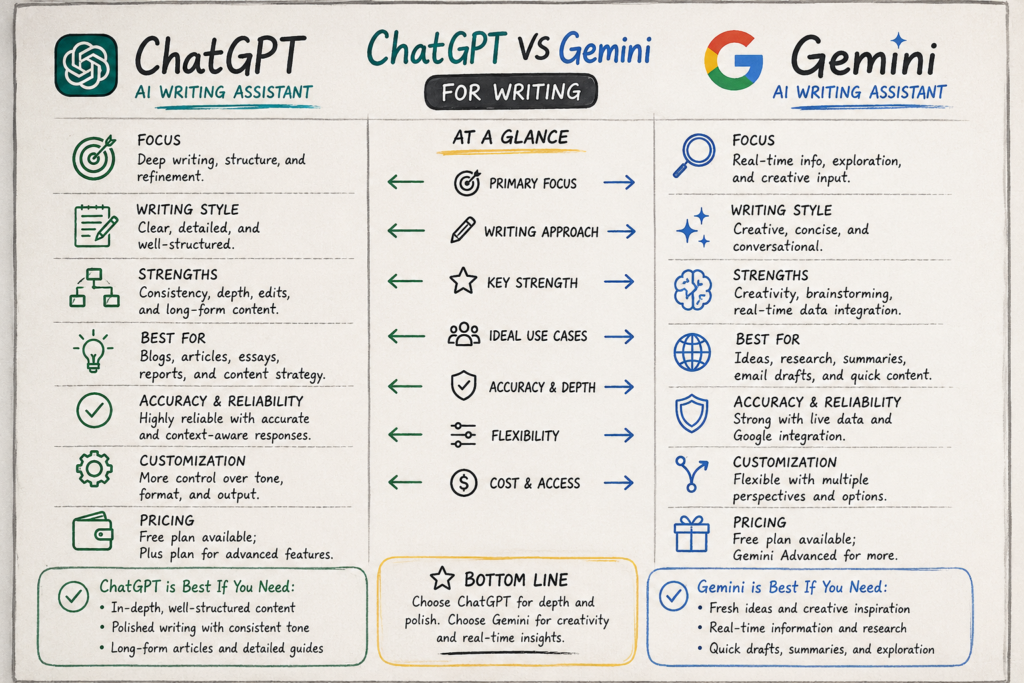
Before I explain each category in detail, here is a brief overview.
| Writing Task | ChatGPT | Gemini | Winner |
|---|---|---|---|
| Blog writing | Excellent | Excellent | ChatGPT |
| SEO content | Excellent | Very good | ChatGPT |
| Long-form articles | Excellent | Very good | ChatGPT |
| Editing | Excellent | Excellent | ChatGPT |
| Rewriting | Excellent | Excellent | Tie |
| Creative writing | Excellent | Very good | ChatGPT |
| Brainstorming | Excellent | Excellent | Tie |
| Google Docs workflow | Very good | Excellent | Gemini |
| Gmail-based writing | Very good | Excellent | Gemini |
| Research workflows | Excellent | Excellent | Tie |
| Content personalization | Excellent | Excellent | Tie |
| Business writing | Excellent | Excellent | Tie |
| Student writing | Excellent | Excellent | Tie |
| Style control | Excellent | Excellent | ChatGPT |
| Google ecosystem integration | Good | Excellent | Gemini |
| Overall writing flexibility | Excellent | Excellent | ChatGPT |
The fact is, there isn’t a single ‘best’ option. The better choice depends on how you work. However, overall, ChatGPT has a slight edge, especially when it comes to content creation.
What Makes a Good AI Writing Tool?
Before comparing ChatGPT and Gemini, it is important to understand what actually makes an AI writing assistant useful.
A good AI writer should do far more than just construct grammatically correct sentences.
It should possess the following capabilities:
- Understanding search intent
- Following detailed instructions
- Maintaining a consistent tone
- Organizing complex information
- Writing naturally
- Rewriting weak sections
- Eliminating unnecessary repetition
- Crafting strong introductions
- Providing useful examples
- Adapting content for different audiences
- Handling long-form content
- Improving clarity and readability
- Assisting with research
- Adhering to formatting requirements
- Working with existing documents and information
Most importantly, the tool should assist the human writer rather than encouraging them to publish AI-generated output directly without review.
Both ChatGPT and Gemini can assist with these tasks, but their respective strengths become more apparent when used for different workflows.
ChatGPT for Writing
ChatGPT has become a favorite tool for many today—whether you use it to write articles, generate outlines, create notes, or rewrite existing content. It is useful for drafting from scratch, rewriting, condensing and improving text, adjusting tone, and transforming rough notes into polished, well-structured text.
Major content creators use ChatGPT today, saving time while boosting productivity. It is a valuable tool for both professionals and beginners.
1. Drafting from scratch
You can provide a topic to ChatGPT and ask it to create:
- An outline
- A blog post
- An introduction
- Product descriptions
- Social media content
- Emails
- Reports
- Scripts
- Headlines
- FAQs
- Landing page copy
Quality improves significantly when you provide context instead of simply saying, “Write an article about smartphones”:
A better prompt can specify the target audience, search intent, tone, article structure, word count, examples, and key information.
2. Rewriting and editing
ChatGPT is incredibly useful when you already have a draft.
You can ask it to:
- Make the writing sound more natural
- Shorten long paragraphs
- Improve transitions (the flow of ideas)
- Remove repetition
- Simplify complex language
- Adjust the tone
- Enhance clarity
- Make the introduction more impactful
- Rewrite the conclusion
- Convert paragraphs into bullet points
This allows it to function not just as a content creation tool, but also as an editor.
3. Controlling the Tone
A major advantage of modern AI writing tools is the ability to control the tone. For example, you can ask ChatGPT to write in a specific tone or style, such as:
- Professional tone
- Friendly tone
- Conversational tone
- Technical tone
- Persuasive tone
- Educational tone
- Journalistic style
- Simple style for beginners
- Premium brand voice
You can also provide a writing sample and ask the model to adopt its characteristics.
4. Working with Uploaded Content
Depending on available features and account configuration, ChatGPT can also work with uploaded files and the information contained within them. OpenAI specifically emphasizes file-based workflows as part of its writing capabilities.
This can be useful when you want to modify an existing document rather than starting from a blank page.
Gemini for Writing
Gemini takes a distinct approach to AI-assisted writing, particularly for users already deeply integrated into the Google ecosystem.
Google incorporates Gemini’s writing capabilities into products like Google Docs and Gmail. In Docs, Gemini can draft new content, rewrite sections, adjust the tone, and help refine existing text.
1. Writing directly in Google Docs
This is one of Gemini’s key advantages.
Instead of creating content in a separate chatbot and then copying it into a document, eligible Google Workspace users can utilize Gemini directly within Google Docs.
Google states that Gemini can assist in creating documents, rewriting sections, adjusting tone, and strengthening arguments by drawing information from connected sources—such as Drive, Gmail, or the web—based on available configurations.
For those who spend a significant amount of time working in Google Docs, this can result in time savings.
2. Matching existing writing styles
Gemini can also reference an existing Google Doc to match specific writing styles and document formatting.
Google’s documentation notes that when creating new content, users can reference an existing document to align with its layout, style, structure, and writing characteristics.
This can be particularly beneficial for:
- Company reports
- Proposals
- Internal documents
- Blog posts
- Marketing documents
- Project plans
3. Writing in Gmail
Gemini can also assist with writing emails.
Google’s Gmail documentation highlights features such as drafting new emails, refining existing text, proofreading, and adjusting writing styles.
For professionals who spend much of their time writing emails, this integration can be more advantageous than using a separate AI writing assistant.
ChatGPT vs. Gemini for Blog Writing
This comparison is particularly interesting for bloggers. Writing a good blog post involves more than just stringing sentences together; it requires several other elements, such as:
- Understanding search intent
- Topic research
- Keyword planning
- Content structure
- A compelling introduction
- Useful information and explanations
- Examples
- Internal linking opportunities
- FAQs (Frequently
- Asked Questions)
- A strong conclusion
- Readability
- Fact-checking
- Original thought/insights
ChatGPT
ChatGPT excels at creating detailed content structures.
For instance, you can use it for tasks such as:
- Understanding the reader’s problem
- Creating a topic outline
- Drafting H2 and H3 sections
- Identifying overlooked questions
- Generating FAQs
- Rewriting weak sections
- Creating examples
- Improving the introduction
- Generating multiple headline options
It is highly useful for bloggers who prefer a ‘content-first’ workflow.
Gemini
Gemini is also excellent for blog writing, especially when your research and source materials are already saved in Google Drive or Google Docs.
Its ability to work with Google Docs and understand existing formatting or writing styles can streamline your workflow.
ChatGPT vs. Gemini for SEO Content
If you are an SEO writer, you must understand user needs within the context of modern search optimization. SEO writing isn’t just about stuffing keywords into an article; it requires writing with the reader’s needs in mind. For instance, if someone searches for “best laptops for students,” it reveals what users are actually looking for, such as:
- Recommendations
- Price range
- Specifications
- Pros and cons
- Comparison tables
- Buying advice
- Usage-based suggestions
- Alternatives
An AI writer needs to grasp this broader objective.
ChatGPT for SEO
ChatGPT can help create:
- Search-intent maps
- Keyword clusters
- Topic outlines
- FAQs
- Featured snippet answers
- Meta titles
- Meta descriptions
- Internal linking suggestions
- Content briefs
- Comparison tables
- Content update plans
It is most effective when provided with a detailed SEO framework.
Gemini for SEO
Gemini is also useful for SEO content, especially when research involves documents, web information, or Google Workspace files.
Its integration with Google’s vast ecosystem makes it highly valuable for content teams that already rely heavily on Google Docs and Drive.
However, no AI tool should be considered a guarantee of SEO authority. Search rankings depend on many factors, not just the writing assistant you use.
ChatGPT vs. Gemini for Writing Long-Form Articles
If you are a content writer, you know that users want comprehensive information in one place, regardless of the topic they are searching for. Creating helpful content that satisfies users allows your material to rank easily on search engines.
If you write long-form articles, ChatGPT is a highly useful tool that simplifies the process. While generating 2,055 words is relatively easy, crafting 2,500 words of *meaningful* content can be challenging. This is because you need to structure the article logically—for instance:
Problem → Context → Explanation → Evidence → Examples → Suggestions → FAQs → Conclusion
ChatGPT excels at creating this type of structure.
It also allows you to work section-by-section rather than attempting to generate the entire draft in one go.
Suggested workflow for long-form articles:
- Research the topic.
- Understand the user’s search intent.
- Create an outline.
- Define the key arguments.
- Write the introduction.
- Elaborate on each main section.
- Add examples.
- Include expert opinions.
- Fact-check claims.
- Edit to remove repetition.
- Improve transitions between sections.
- Optimize the title and metadata.
- Finally, have a human review it.
Gemini can follow a similar process, especially when the article is being written in Google Docs.
ChatGPT vs Gemini for Editing and Rewriting
Both tools perform exceptionally well when it comes to editing and rewriting; you can use either one to edit text or rewrite paragraphs. You can simply provide a paragraph to either tool and ask it to make the text clearer and more polished.
Both tools are highly beneficial for beginners in this regard, allowing new users to work without any hassle.
Gemini’s integration with Google Docs is a major advantage for users who edit documents directly within the Google ecosystem.
On the other hand, ChatGPT offers a highly flexible approach to editing through conversation.
You can improve an article step-by-step:
Draft → Review → Rewrite → Shorten → Refine Tone → Final Touch
ChatGPT vs Gemini for Research-Based Writing
To become a successful content writer, you need to create helpful content that addresses users’ needs. Research is a crucial task for any successful content writer; if you know how to conduct thorough research, you can easily produce high-quality content. When using AI for research, you should verify the information before incorporating it into your blog.
Both ChatGPT and Gemini can assist with research, but you should always verify key claims using reliable sources. Gemini integrates seamlessly with Google’s information ecosystem and can work with connected Google Workspace sources within supported workflows. Google also emphasizes “deep research” capabilities that leverage both the web and custom sources.
ChatGPT can also be used for research workflows and structured analysis, though its specific capabilities may vary depending on the model, plan, and product configuration.
Best Practices
Verify information regarding key claims using these sources:
- Government websites
- Official company documents
- Academic institutions
- Peer-reviewed research
- Research organizations
- Primary sources
- Official statistics
Do not assume that AI-generated citations are accurate simply because they appear credible.
ChatGPT vs Gemini for Creative Writing
When it comes to creative writing, one might wonder what exactly is involved. Creative writing encompasses:
- Stories
- Screenplays
- Character development
- Dialogue
- Poetry
- Narratives
- Creative concepts
- Story ideas
- Brand storytelling
The biggest challenge is avoiding generic writing.
A good AI writing assistant helps you develop a distinct style rather than simply generating predictable sentences.
ChatGPT generally performs very well when given detailed creative instructions.
For example:
Write a travelogue from the perspective of a first-time traveler. Use short paragraphs, sensory details, and natural dialogue, and avoid exaggerated descriptions.
Specific instructions usually yield better results than generic prompts.
Gemini is also capable of brainstorming and creative writing, though your experience may vary depending on the specific task and the model used.
ChatGPT vs Gemini for Business Writing
Both tools are excellent for business writing, so if you are a business writer, you can use either one. These tools can assist you with the following:
- Emails
- Reports
- Proposals
- Presentations
- Meeting summaries
- Marketing copy
- Product descriptions
- Internal documentation
- Business plans
- Customer communication
If your company already relies heavily on Google Workspace, Gemini holds a clear advantage.
Depending on the plan and feature availability, Google integrates Gemini’s features into Docs, Gmail, Drive, Sheets, Slides, and other Workspace products.
ChatGPT offers greater flexibility as a standalone writing and reasoning environment.
ChatGPT vs Gemini for Students
Both tools are excellent for students, and you can effectively utilize both of them. With the help of these tools, you can:
- Understand complex concepts
- Summarize notes
- Improve grammar
- Brainstorm new ideas
- Prepare study-related questions
- Structure essays
- Understand research topics
- Rewrite confusing paragraphs
Gemini can be particularly convenient for students who already use Google Docs.
ChatGPT is useful when a student wants to interact in a conversational style, much like talking to a tutor.
Essential Guidelines for Students
AI should aid the learning process, not replace it.
Instead of saying:
“Write my entire assignment.”
A better approach is:
“Explain this topic in simple language and provide an outline so I can write the assignment myself.”
This approach helps in gaining a proper understanding of the subject matter.
ChatGPT vs Gemini: Pros and Cons
ChatGPT Pros
- Excellent general-purpose writing assistant
- Strong long-form content capabilities
- Flexible tone control
- Strong brainstorming
- Excellent rewriting
- Useful for SEO content workflows
- Good conversational editing
- Strong creative writing capabilities
- Works well for structured prompts
- Useful across many content formats
ChatGPT Cons
- AI output still requires human review
- Can produce generic writing with weak prompts
- Important facts should be independently verified
- Some advanced features depend on plan and availability
- It can sometimes make confident factual mistakes
Gemini Pros
- Strong writing capabilities
- Excellent Google Workspace integration
- Useful inside Google Docs
- Strong Gmail integration
- Can reference existing Google documents
- Useful for collaborative business workflows
- Good brainstorming and rewriting
- Strong research-oriented workflows
Gemini Cons
- Output quality can vary by task
- Some features depend on Google AI or Workspace plans
- Google ecosystem integration may matter less to users outside Workspace
- AI-generated information still needs verification
- Creative output can sometimes feel generic
Which AI Is Better for You?
You are the best person to decide which AI suits you best, because no one knows your work better than you do. Before choosing any AI tool, you need to understand which specific tasks it can simplify and what work you intend to use it for. Here are a few points to consider:
Choose ChatGPT if you are a:
- Blogger
- Freelance writer
- SEO content writer
- Copywriter
- Content marketer
- Student
- Researcher
- Creator
- Website owner
ChatGPT is an excellent choice if you need a single, flexible tool for brainstorming, writing, editing, research assistance, and content optimization.
Choose Gemini if you are a:
- Heavy user of Google Docs
- Google Workspace professional
- Business user who relies heavily on Gmail
- User who works on multiple documents in Google Drive
- Professional who primarily collaborates within Google Workspace
Gemini is particularly useful when the location of your content is just as important as the AI’s writing capability.
Can You Use ChatGPT and Gemini Together?
Yes, absolutely. Today, many content creators, writers, and researchers use both tools simultaneously. You can utilize both tools based on the specific requirements of your work; so, never worry about which tool is “better” overall. Instead of asking yourself which tool you should use, ask yourself which tool is best suited for each specific stage of the process.
A practical two-AI workflow
Step 1: Research
Use reliable sources and AI research tools to understand the topic.
Step 2: Content strategy
Use ChatGPT to develop:
- Search intent
- Content angle
- Outline
- Questions
- Reader pain points
Step 3: First draft
Use either tool to create the initial draft.
Step 4: Fact-checkin
Verify important claims against primary sources.
Step 5: Editing
Use the second AI as a reviewer.
Ask it to identify:
- Repetition
- Weak arguments
- Unsupported claims
- Unclear sentences
- Missing information
- Poor transitions
Step 6: Human editing
This is the most important step.
Add:
- Personal experience
- Original examples
- Expert opinions
- First-hand observations
- Original data
- Unique insights
Step 7: SEO optimization
Finally, optimize the article for:
- Search intent
- Internal links
- Readability
- Titles
- Metadata
- Featured snippets
- Helpful FAQs
The goal should not be to publish AI output.
The goal should be to use AI to produce better human-created content more efficiently.
Best Practices for AI-Assisted Writing
1. Don't publish raw AI content
Even when the writing sounds good, review it.
AI can make factual errors, misunderstand context, or produce claims that sound authoritative without sufficient evidence.
2. Give detailed prompts
Instead of:
Write an article about SEO.
Try:
Write a beginner-friendly guide explaining technical SEO. Cover crawling, indexing, Core Web Vitals, internal linking, structured data, and common mistakes. Use practical examples and short paragraphs.
Better instructions usually produce better results.
3. Add your own experience
This is particularly important for high-quality content.
For example, instead of simply explaining how to optimize a WordPress website, include:
- What you tested
- What worked
- What failed
- What changed
- What you would do differently
That makes the article more useful and distinctive.
4. Verify statistics
If an AI gives you:
“73% of users…”
Find the original source before publishing it.
Never publish a statistic simply because it sounds credible.
5. Avoid keyword stuffing
SEO is not about repeating the same keyword in every paragraph.
Use natural variations and cover the topic compr
6. Edit for human readers
Ask:
Would I actually say this sentence to another person?
If not, rewrite it.
ChatGPT vs Gemini for Writing: Final Verdict
So, which one is better for writing—ChatGPT or Gemini?
The answer depends on your specific needs.
For most dedicated writers, ChatGPT is the better overall choice. It excels at drafting, rewriting, brainstorming, organizing long-form content, creative writing, and facilitating easy editing through conversation.
For those who rely heavily on the Google ecosystem, Gemini is the better option. Its integration with Google Docs, Gmail, Drive, and other Workspace products can significantly streamline the writing process.
However, the most important point is that no tool creates excellent content on its own.
The quality of your final article depends on a combination of factors:
AI assistance + reliable research + human insight + original experience + careful editing.
For bloggers and SEO writers, I would primarily use ChatGPT for writing and content strategy, while using Gemini for Google Workspace-based research, document editing, and workflow management.
If you already use Google Docs extensively, there is no compelling reason to overlook Gemini. If your main priority is creating, refining, and organizing content, ChatGPT is a robust and versatile choice.
Ultimately, the best AI writing tool is the one that helps you create truly useful content—rather than just generating more words.
Frequently Asked Questions
1. Is ChatGPT better than Gemini for writing?
Generally, ChatGPT is slightly better for writing due to its robust capabilities in drafting, rewriting, brainstorming, organizing long-form content, and controlling tone. However, for writers who work extensively within Google Workspace, Gemini might be the better choice.
2. Which is better for writing blogs: ChatGPT or Gemini?
ChatGPT is generally better for standalone blog writing and content planning. Gemini is particularly useful when the blogging workflow relies on Google Docs, Drive, and other Google Workspace tools.
3. Which AI is better for SEO writing?
ChatGPT holds a slight edge when it comes to creating SEO content strategies, outlines, FAQs, content briefs, and long-form articles. However, no tool can replace proper keyword research, search-intent analysis, fact-checking, or human editing.
4. Can ChatGPT and Gemini create human-like content?
Yes. Both can generate natural-sounding content, though the quality depends largely on the prompt, context, editing, and the subject matter. Raw AI-generated output should be reviewed before publication.
5. Is Gemini better for Google Docs?
Yes. Gemini offers significant advantages when writing directly in Google Docs. It provides features such as drafting, rewriting, tone adjustment, matching document formatting, and referencing existing documents.
6. Which is better for rewriting content?
Both are highly capable. ChatGPT excels at conversational interaction and iterative editing, whereas Gemini is more convenient when the content already resides in Google Docs.
7. Which is better for creative writing?
ChatGPT generally has a slight edge in creative writing, especially when you provide detailed instructions regarding voice, structure, characters, pacing, and tone.
8. Can AI-generated content rank on Google?
Relying solely on AI does not guarantee rankings. Search performance depends on utility, originality, relevance, accuracy, authority, user satisfaction, and various other factors. AI should be used to enhance the content creation process rather than simply generating large volumes of low-value text.
9. Should I use ChatGPT or Gemini for my blog?
If your priorities include SEO strategy, content planning, and writing or editing long-form content, ChatGPT is a good choice. If your workflow relies heavily on Google Docs and Google Drive, Gemini might be more convenient.
10. Can I use both ChatGPT and Gemini?
Yes, using both can be beneficial. For instance, you could use one tool to create outlines and drafts, and the other for reviewing, rewriting, conducting research, or handling document-related tasks.
Also Read: Techlymte